Free DNS vs. Managed DNS: The Real Cost of “Good Enough”
If your DNS came bundled with your domain registration, or you pointed your nameservers at Cloudflare’s free plan years ago and haven’t thought much about it since, you’re certainly not alone.
For many small and mid-sized businesses, DNS feels like a problem that has already been solved. It was free, it works most of the time, and there is usually something more urgent competing for the IT budget.
And to be fair, free DNS does work.
The question is what happens when it doesn’t, or when your business reaches the point where you need DNS to do more than simply point visitors in the right direction.
That’s where the real cost comparison becomes more interesting. Rather than looking only at the monthly price, it makes sense to consider what free DNS includes, what managed DNS adds, what you may need to pay for elsewhere, and what those gaps could cost when something goes wrong.
There are also situations where free DNS remains perfectly adequate. So, this isn’t an argument that every business needs to start paying for DNS. It’s about understanding when “good enough” really is good enough, and when it starts becoming a business risk.
What “Free DNS” Usually Means in Practice
Most businesses using free DNS fall into one of two camps.
Registrar DNS. These are the nameservers bundled with a domain registration from providers such as GoDaddy or Network Solutions. DNS is essentially included as a feature of buying the domain rather than being treated as a dedicated availability service.
Cloudflare Free. Cloudflare provides a genuinely good anycast network on its free plan. However, DNS also acts as an entry point into its wider CDN and security platform, and many of the availability features businesses eventually need sit behind paid services. There is no uptime SLA below the Business plan at $200 per month, health-checked failover requires a paid load-balancing add-on, and features such as zone transfers and custom nameservers are reserved for higher tiers.
Neither approach is inherently bad. They are simply limited by design.
For many businesses, those limitations remain invisible until something breaks. Eventually, something usually does.
Why DNS Downtime Deserves More Attention
It’s easy to underestimate DNS because it normally sits quietly in the background. But when DNS becomes unavailable, customers can’t reach the applications, websites, APIs, and services sitting behind it, even if those systems themselves are running perfectly well.
The cost of that downtime can escalate quickly.
ITIC’s 2024 survey of more than 1,000 organizations found that a single hour of downtime exceeded $300,000 for more than 90% of mid-sized and large enterprises. Forty-one percent reported hourly costs ranging from $1 million to more than $5 million.
Most small and mid-sized businesses won’t experience losses on that scale, of course. But even at two orders of magnitude below those figures, a few thousand dollars per hour quickly changes the economics of paying for greater DNS resilience.
The Uptime Institute paints a similar picture. Fifty-four percent of organizations reported that their most recent significant outage cost more than $100,000, while one in five said the cost exceeded $1 million.
What is particularly important is that DNS failures are rarely caused by some extraordinary event.
Look at major outages involving Akamai Edge DNS in 2021, Meta/Facebook in 2021, Cloudflare in 2022 and again in 2025, and AWS us-east-1 in 2025. The recurring culprits are configuration changes and software defects rather than sophisticated attackers.
The Uptime Institute’s Annual Outage Analysis 2025 found that nearly 40% of organizations had suffered a major outage caused by human error during the previous three years.
That matters because some of the simplest protections against human error, including audit logs, change notifications, and the ability to quickly restore a previous configuration, are exactly the kinds of features that free DNS often leaves out.
What You Actually Give Up With Free DNS
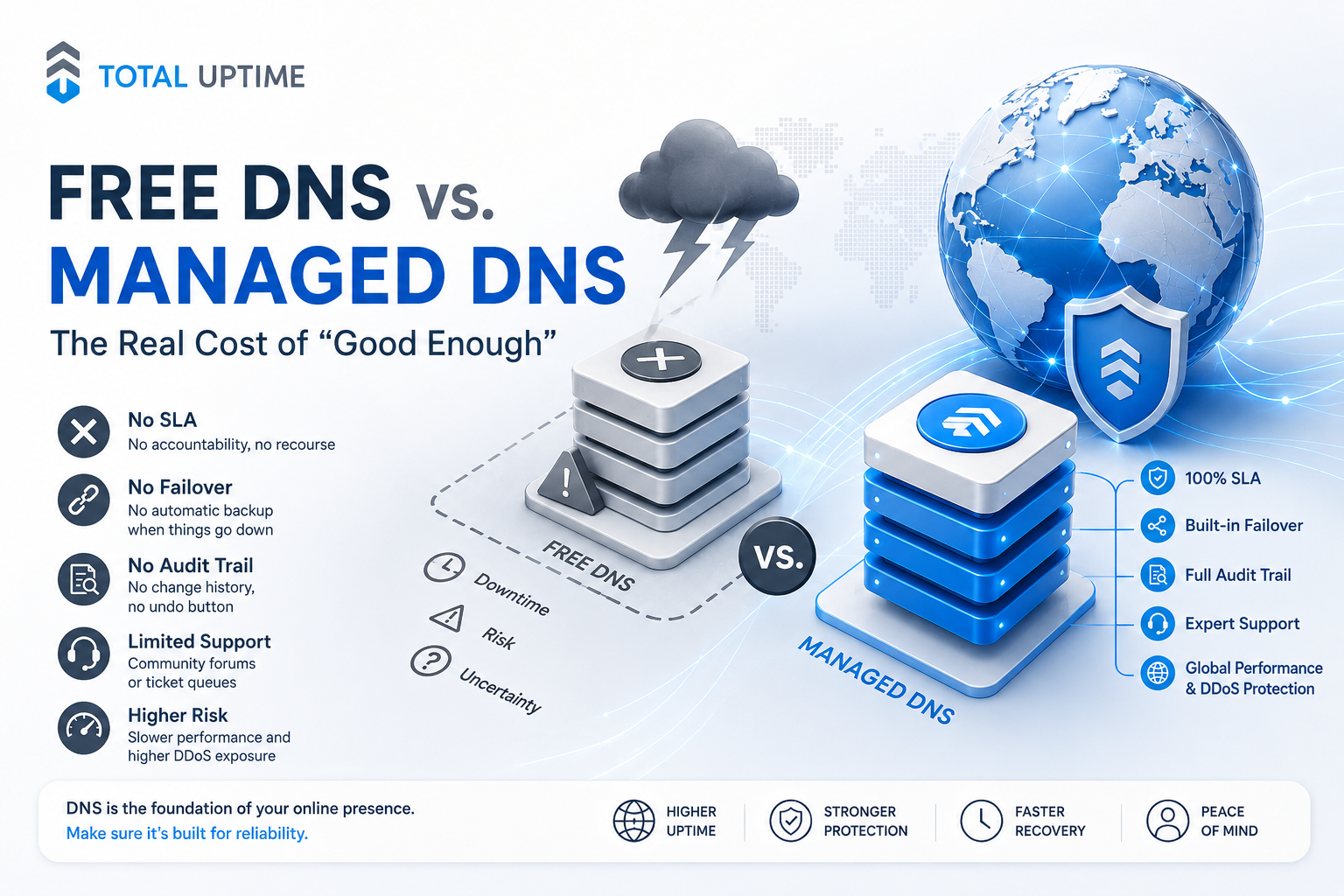
1. No SLA Means No Recourse
An SLA isn’t really about receiving compensation after an outage. Its greater value is the accountability and service priority that comes with it.
Cloudflare’s 100% uptime SLA, for example, begins with its Business plan at $200 per month. The Free and Pro plans don’t include one. Registrar DNS also typically provides no meaningful, enforceable DNS availability SLA.
GitLab experienced outages in both 2020 and 2022 because its sole DNS/CDN provider suffered an outage. In a setup like this, if DNS resolution fails and there is no SLA behind the service, your options may amount to opening a support ticket and waiting.
For a business that depends on its online services being reachable, that’s not much of a recovery plan.
2. No Failover
This is arguably the biggest functional difference.
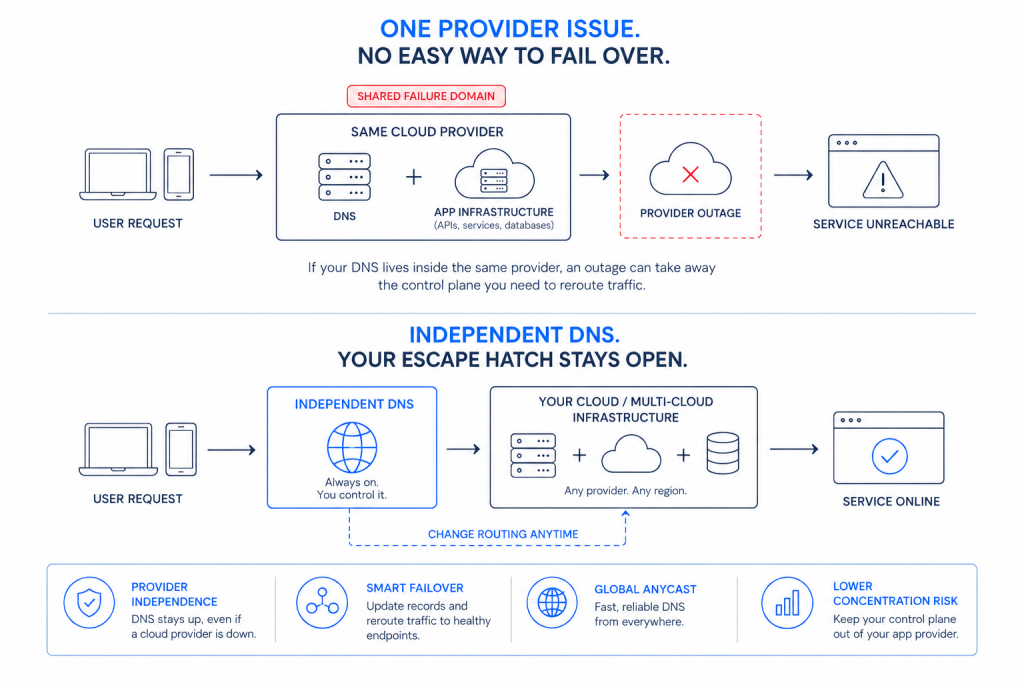
Imagine your primary web server, hosting provider, or cloud region goes down. With basic free DNS, your domain may continue resolving perfectly well. Unfortunately, it keeps resolving to an IP address that is no longer responding.
DNS failover changes that.
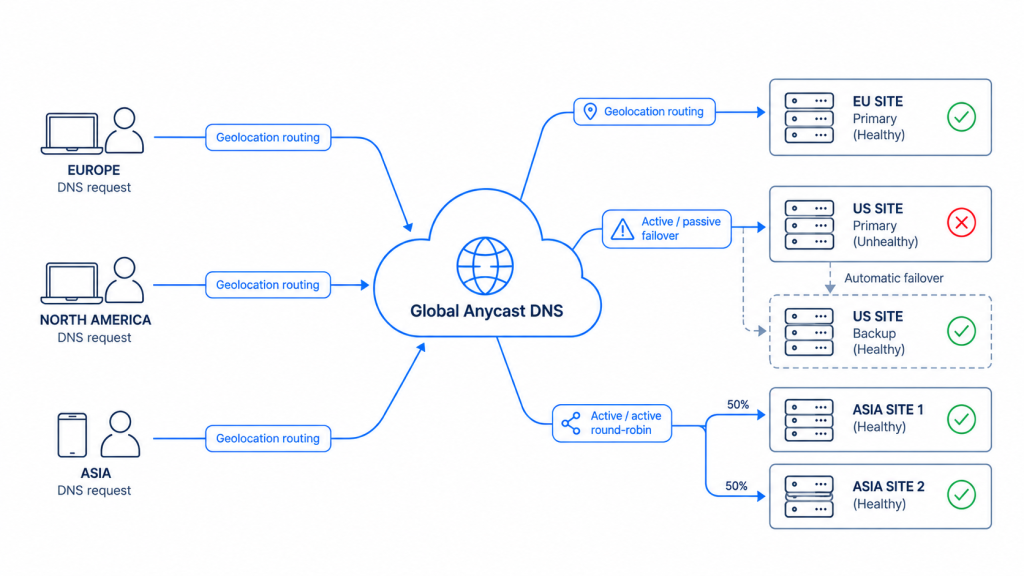
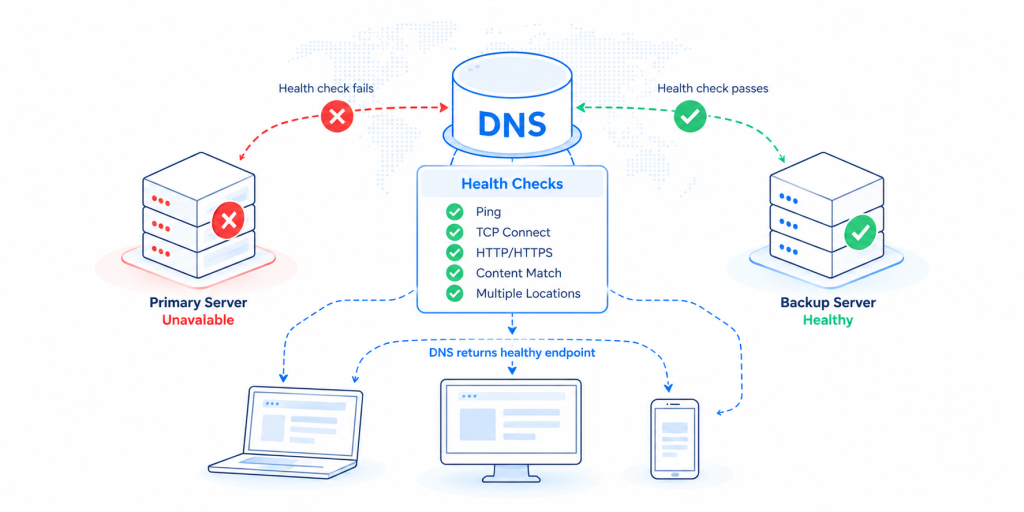
Health checks continuously monitor the destination behind a DNS record. If the primary endpoint becomes unavailable, traffic can automatically be redirected to a standby server, another data center, or a different cloud environment.
Instead of customers encountering an outage while someone manually changes DNS records, the failure can become largely invisible to them.
Registrar DNS generally doesn’t provide this functionality at all. Cloudflare requires its paid Load Balancing add-on. With Amazon Route 53, you can build it yourself using health checks and routing policies, but this introduces additional configuration and per-endpoint health-check fees. Traffic Flow policies are priced at $50 per policy record per month.
With an independent managed DNS provider, failover is typically part of the service and supported by the provider rather than becoming another infrastructure project your team needs to build and maintain.
3. No Audit Trail and No Undo Button
Considering how often configuration mistakes contribute to outages, there is one DNS question every IT team should be able to answer quickly:
Who changed what, when did they change it, and how do we put it back?
With many free and registrar DNS services, there is little or no meaningful change history.
Even Cloudflare’s audit logs do not provide before-and-after values for every change, and there is no zone restore or rollback capability at any tier. Hyperscalers can log API activity, but reconstructing a DNS zone and restoring it to an earlier state can still be a manual process.
That might be manageable on a normal Tuesday afternoon.
It feels very different during a live incident when customers are offline and everyone wants to know how quickly service will be restored.
4. No Expert Support When It Matters
Almost every provider can claim to offer “support.” The more useful question is what that support actually looks like during an incident.
Can you speak to a DNS engineer, or are you submitting a ticket and hoping someone responds soon?
With Cloudflare, phone support is reserved for Enterprise customers. Free and Pro users rely primarily on community forums and ticket-based support.
AWS also charges separately for higher levels of human support. Developer Support starts at $29 per month and provides business-hours access with response times of up to 12 hours. Business Support starts at a minimum of $100 per month.
Even specialist DNS providers price direct expertise as a premium. IBM’s NS1 Connect, for example, starts at $99 per month for its Essentials tier.
When DNS is down, the difference between access to an engineer and waiting in a ticket queue becomes much more significant than it looked when everything was working.
5. Performance and Propagation
DNS performance isn’t only about whether a query eventually receives an answer. How quickly it receives that answer also matters.
Anycast DNS networks route queries to the nearest or best available location across multiple global points of presence. Registrar DNS may use unicast or a much lighter anycast footprint, which can result in slower DNS lookups for customers who are farther away.
A few milliseconds here and there may not sound significant, but small delays across the delivery chain can contribute to page-load times and, ultimately, user experience and conversions.
Propagation speed also becomes important when you need to make a change. Premium managed DNS networks can apply record updates within seconds, while budget platforms may take minutes or even hours.
Again, that difference matters most when you’re trying to fix something quickly.
6. DDoS Exposure
DNS remains an attractive attack target for a very simple reason: if an attacker can take down DNS, they can effectively make everything behind it disappear from the internet.
The IDC/EfficientIP DNS Threat Report found that 79% of organizations had experienced a DNS attack within a 12-month period. The average cost was $924,000 per attack, and 82% of affected organizations experienced application downtime.
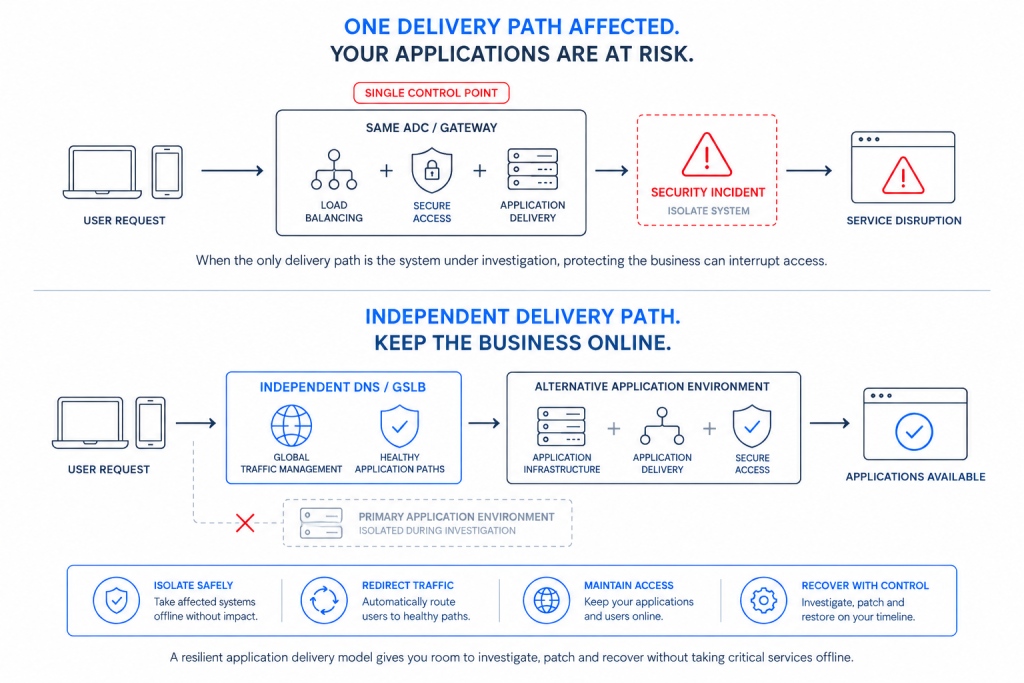
The 2016 Dyn attack remains one of the clearest examples of DNS becoming a single point of failure. Major services including Twitter, Spotify, Netflix, and PayPal became unreachable for hours. According to the U.S. Department of Justice, Sony alone reported $2.7 million in losses.
Managed DNS infrastructure is specifically built and sized to withstand this kind of traffic. Basic registrar DNS generally isn’t.
The $50-a-Month Math
This is where the total cost of ownership becomes much easier to see.
Independent managed DNS for a handful of zones will typically cost somewhere between $20 and $60 per month. For the sake of the comparison, let’s call it $50 per month, or $600 per year.
Now compare that with the alternatives.
One hour of downtime at a relatively modest SMB cost of $2,000 to $5,000 per hour, still only a fraction of the enterprise figures above, would pay for roughly three to eight years of managed DNS.
Trying to replicate the same functionality à la carte can also become considerably more expensive. Cloudflare Business costs $200 per month for the SLA alone. An AWS Business Support plan starts at $100 per month before you’ve configured a single health check. Route 53 Traffic Flow visual policies add another $50 per policy record per month.
Then there is the cost that never appears on a provider invoice: your team’s time.
Every failover process you script and maintain yourself, every DNS zone you have to reconstruct from memory, and every outage your IT team troubleshoots without specialist help has a labor cost attached to it.
Looked at as availability insurance, $50 per month can be one of the least expensive resilience investments in your technology stack.
Side-by-Side Comparison
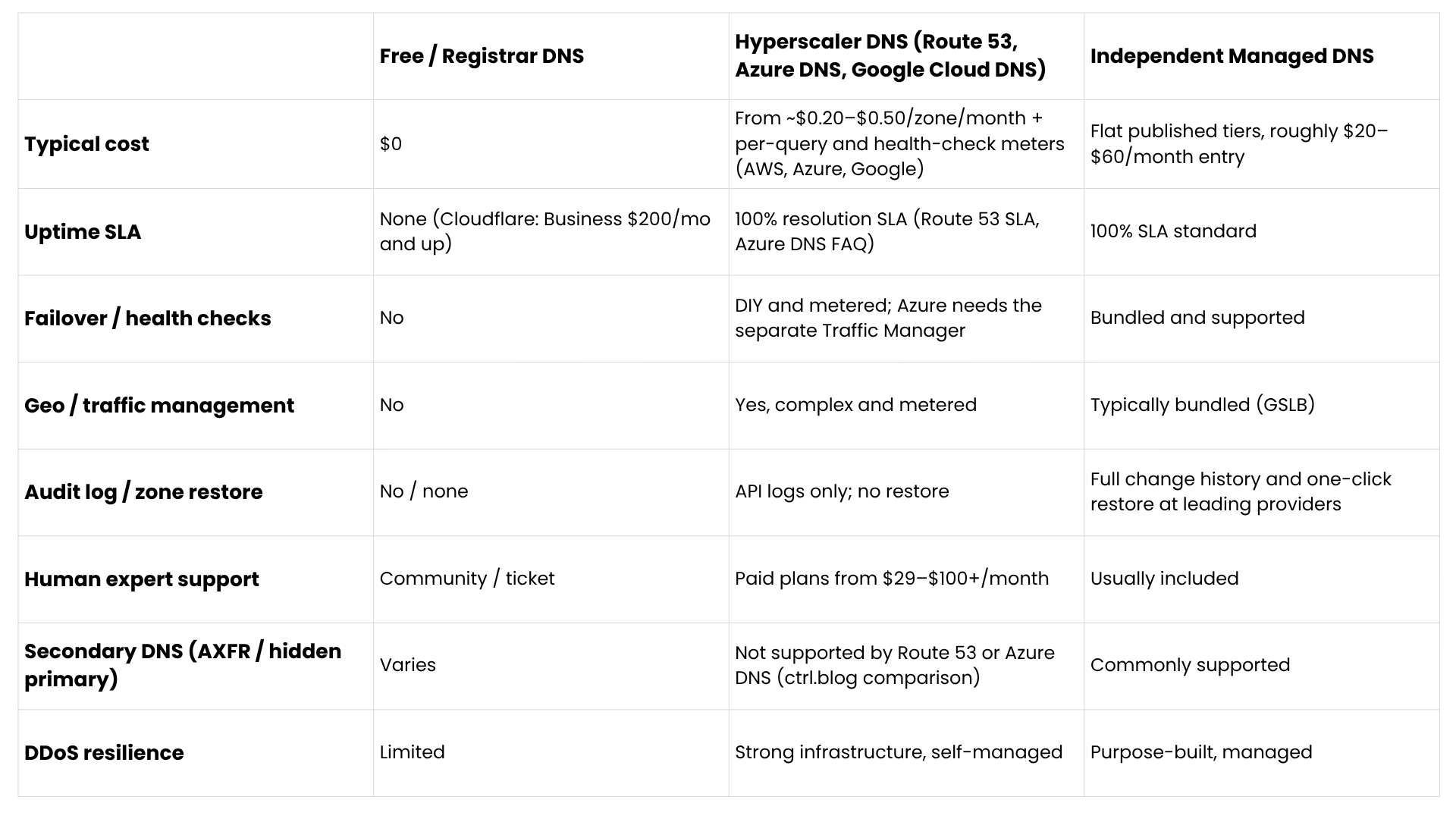
There isn’t a universally “best” column in this table. What it shows is where the $0 price tag comes with trade-offs, and where those trade-offs may matter to your business.
When Free DNS Is Genuinely Fine
This is where honesty matters more than a sales pitch. There are plenty of situations where paying for managed DNS simply isn’t necessary.
Your website is a brochure, blog, or side project. If being offline for a few hours has no measurable financial or reputational impact, free DNS may be all you need.
You have nowhere to fail over to. If everything runs on a single server and there is no standby environment, automatic DNS failover has nowhere useful to send traffic. In that situation, improving the underlying architecture should come before paying for advanced DNS features.
You’re pre-revenue. When every dollar matters and the reputational impact of an outage is still low, spending $50 per month on managed DNS may genuinely not be a priority.
You have DNS expertise in-house. If your team has the knowledge and time to build monitoring, automation, health checks, scripts, and runbooks around a low-cost hyperscaler DNS platform, that can also be a perfectly reasonable approach.
If one of these describes your business, keep the $0 plan and revisit the decision as you grow.
The problem isn’t choosing free DNS. It’s remaining on free DNS after your revenue, customer expectations, infrastructure, or compliance requirements have outgrown it.
A Quick Self-Assessment
Paid managed DNS is probably worth considering if any of the following are true:
1. An hour of downtime would cost your business more than an entire year of managed DNS.
2. You already have, or should have, a standby server, second region, or backup hosting environment.
3. More than one person can change DNS records, but nobody could confidently tell you who changed what last Tuesday.
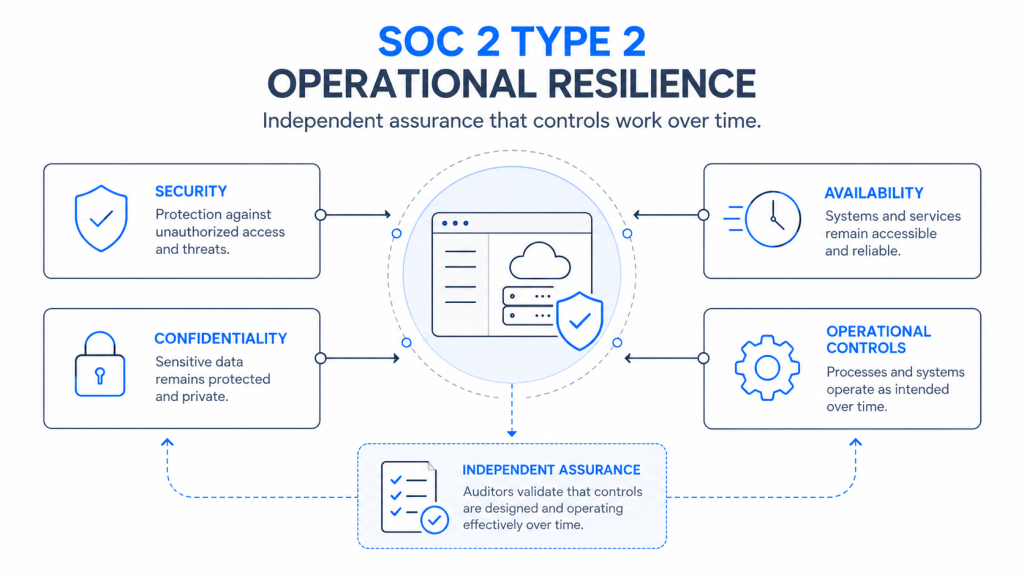
4. Customers, partners, or regulators expect uptime commitments that you currently can’t demonstrate.
5. During a DNS incident, you would rather speak to an experienced DNS engineer than wait for a support ticket.
The more boxes you check, the harder it becomes to justify choosing DNS based purely on its monthly price.
The Bottom Line
Free DNS isn’t a scam, and it isn’t inherently unreliable. It is simply a minimum viable service designed for a different level of requirement.
The real cost of “good enough” tends to appear at exactly the wrong time: during an outage, after a bad DNS record change, during an attack, or at 2 a.m. when something has gone wrong and there is nobody to call.
Against the industry-measured cost of downtime, paying a predictable $30 to $60 per month for SLA-backed DNS resolution, automatic failover, change auditing, and access to human expertise can be a straightforward TCO decision for a business that depends on being online.
At Total Uptime, that’s the bundle we provide: managed Cloud DNS backed by a 100% uptime SLA, built-in failover and Global Server Load Balancing, full change auditing with one-click restore, and 24/7 access to real DNS engineers, all at published, predictable prices.
Not sure whether your current DNS setup would survive a bad day?
We’re happy to take a look. No obligation and no hard sell.