What Is Load Balancing, and Do I Need It?
Most people never think about load balancing until something stops working.
A website becomes painfully slow during a traffic spike. An application server fails and suddenly nobody can log in. A planned maintenance window turns into an outage because there is nowhere else to send users.
These might look like different problems, but they often have something in common: too much depends on a single piece of infrastructure.
That is where load balancing comes in.
At its simplest, load balancing distributes application or network traffic across multiple servers or endpoints rather than relying on one resource to handle everything. A load balancer can monitor those resources, decide where each request should go and stop sending new traffic to an endpoint that is no longer healthy.
It sounds straightforward, but load balancing plays an important role in something much bigger: keeping applications available, responsive and resilient.
What is load balancing?
Imagine an application running on three servers.
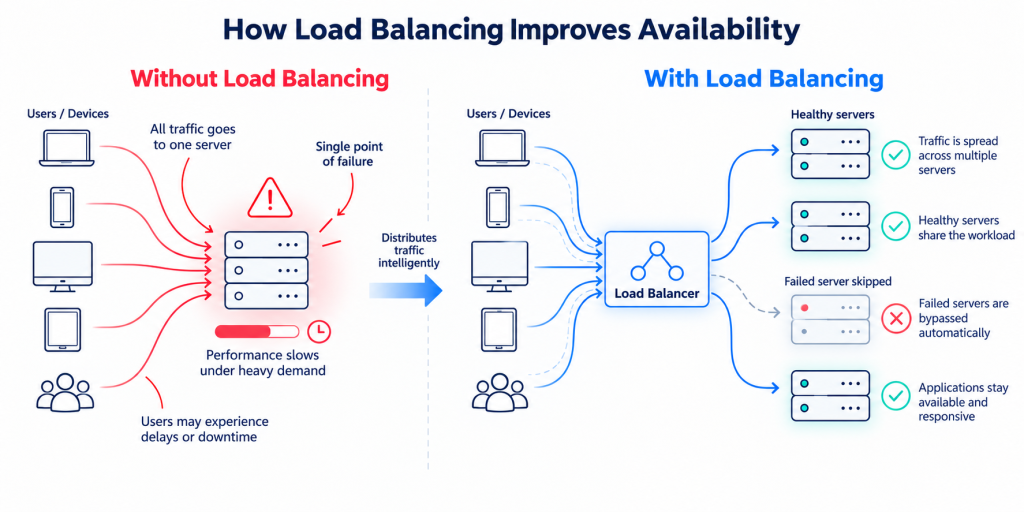
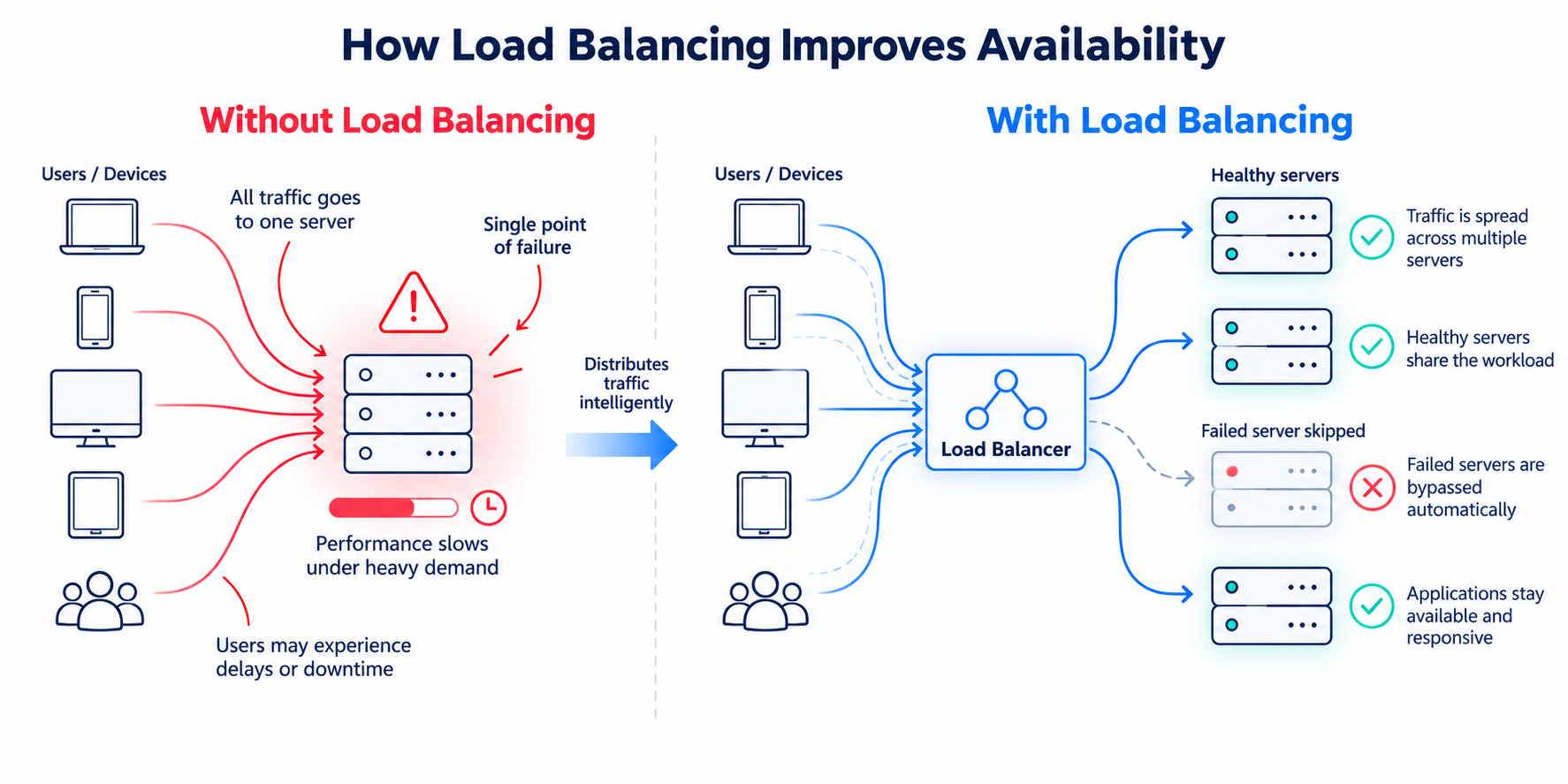
Without load balancing, users might all be sent to one server. As traffic increases, that server has to work harder and harder. If it becomes overloaded or fails completely, the application may become slow or unavailable even though the other servers are perfectly healthy.
Put a load balancer in front of those servers and the situation changes.
Incoming traffic reaches the load balancer first. Instead of automatically sending every request to the same place, the load balancer decides which healthy server should receive it.
Traffic can be spread across all three servers. If one becomes unavailable, the load balancer can remove it from service and direct new requests toward the remaining healthy infrastructure.
That basic principle has not changed much over the years. What has changed is where applications run and how sophisticated traffic management has become.
Applications no longer live neatly inside a single data center. They may span private infrastructure, public clouds, multiple cloud providers, colocation facilities and different geographic regions. Modern load balancing has evolved with them.
How does load balancing work?
A load balancer sits between users and the infrastructure delivering an application.
When someone visits a website, connects to an application or makes an API request, that traffic reaches an application endpoint. The load balancer then determines where the connection or request should go.
There are several parts to this process.
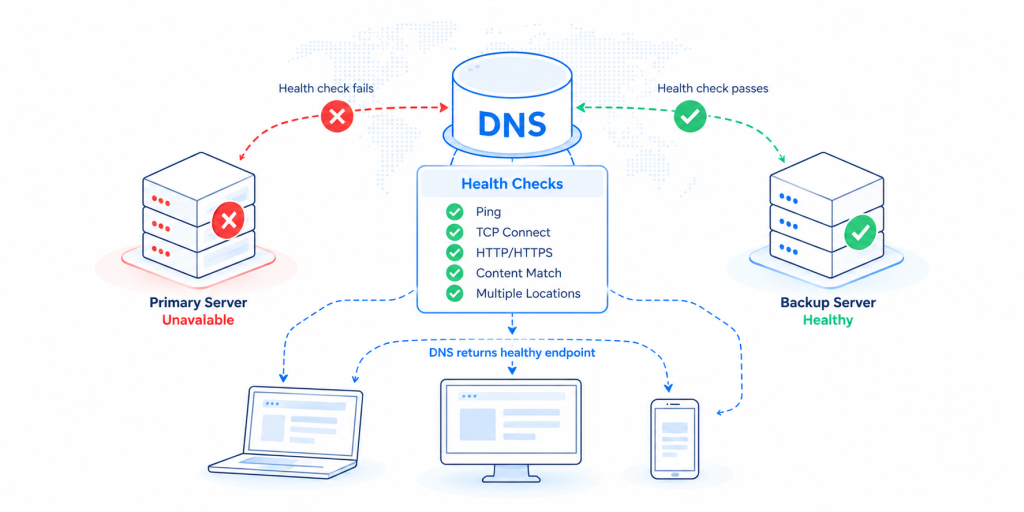
First, it checks what is healthy
A useful load balancer does more than ask whether a server is switched on.
Health checks can determine whether the actual application or service behind that server is responding correctly. If an endpoint fails its health check, new traffic can be sent elsewhere rather than continuing to send users to something that is not working.
This is one of the reasons load balancing is so closely connected to application availability.
Then, it decides where traffic should go
There is no single way to distribute traffic.
Different applications need different traffic management policies, which is why modern load balancers support a range of methods.
Round Robin sends connections sequentially across available servers.
Least Connections directs new traffic toward the server currently handling the fewest active connections.
Least Response Time can take server or application responsiveness into account.
Weighted Distribution lets you give more powerful infrastructure a larger share of the traffic.
Session Persistence can keep a user associated with a particular backend resource when the application requires it.
The right approach depends on the application, the infrastructure behind it and what you are trying to achieve.
Layer 4 vs. Layer 7 load balancing
If you start researching load balancing, you will quickly come across references to Layer 4 and Layer 7.
The difference is really about how much the load balancer understands about the traffic it is handling.
Layer 4 load balancing works at the transport layer and makes routing decisions based largely on information such as IP addresses, TCP or UDP ports and connections.
Layer 7 load balancing operates at the application layer. Because it can understand protocols such as HTTP and HTTPS, it can make more application-aware decisions about where traffic should go.
For example, Layer 7 rules could potentially route requests differently according to a hostname, path or other characteristics of the application request.
Neither approach is automatically “better.” Enterprise application delivery environments frequently need support for both, depending on the service and traffic involved. Total Uptime’s managed Cloud Load Balancing and self-hosted edgeADC options both support Layer 4 and Layer 7 application traffic management.
What problems does load balancing actually solve?
The word “balancing” can make it sound as if the primary objective is simply to divide traffic evenly.
That is only part of the story.
It reduces dependence on a single server
If an application depends on one server and that server fails, you have a fairly obvious single point of failure.
Using multiple application resources creates redundancy. Load balancing makes that redundancy useful by determining which resources should actually receive traffic.
It helps applications handle changing demand
Traffic rarely arrives at a perfectly consistent rate.
There may be seasonal demand, campaigns, customer activity, large file transfers, API requests or unexpected traffic spikes. Spreading requests across available capacity can help prevent one server from becoming the bottleneck while other resources sit underused.
It can improve application availability
Load balancing can detect an unhealthy server or application endpoint and stop directing new traffic toward it.
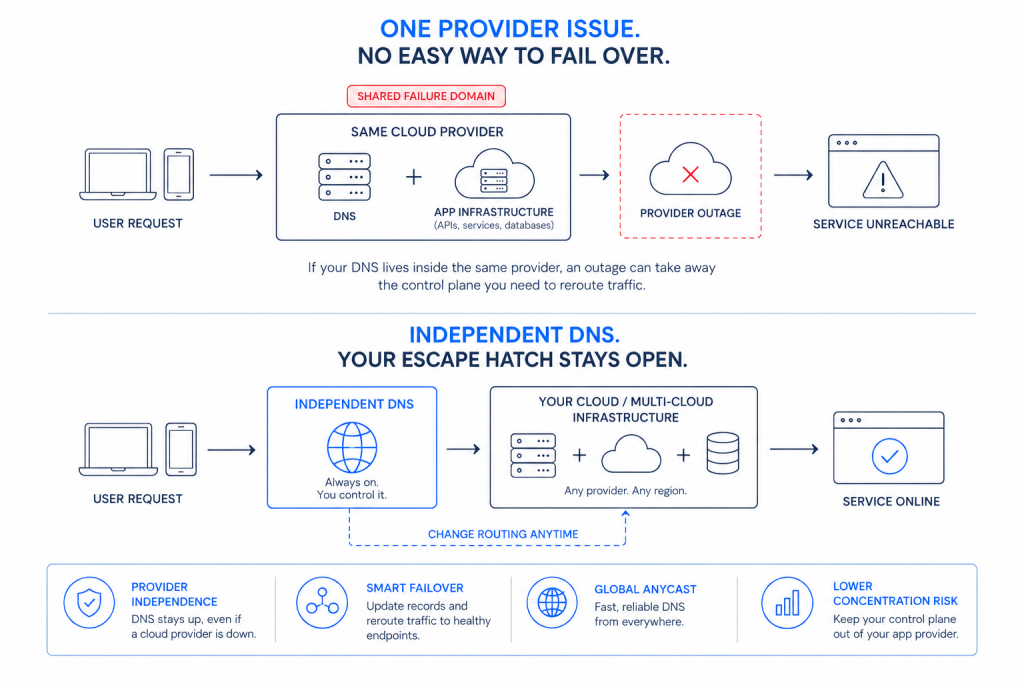
That does not mean a load balancer by itself can guarantee that an application will never go down. Availability also depends on DNS, networks, cloud platforms, data centers, connectivity, application architecture and other infrastructure.
Load balancing protects one important part of that chain.
It makes maintenance easier
Imagine needing to patch or upgrade one of your application servers.
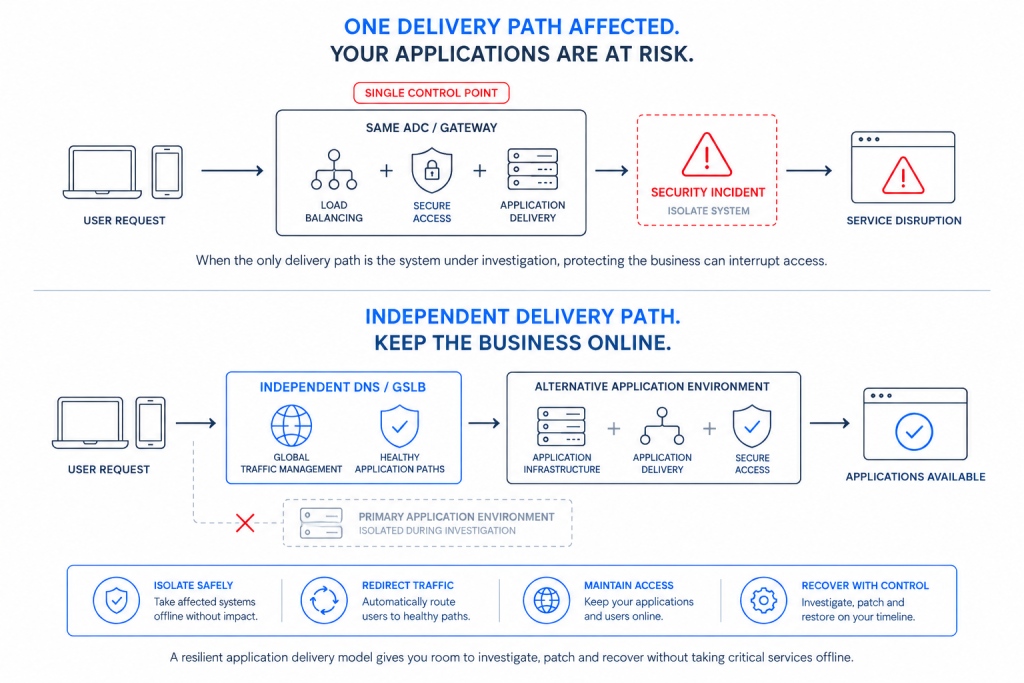
If traffic can be shifted toward other healthy resources first, infrastructure can potentially be removed from service without taking the entire application offline.
For teams operating business-critical applications, that flexibility can be just as important as responding to an unexpected failure.
So, do I actually need a load balancer?
The original version of this article gave a fairly simple answer: yes.
The more accurate answer today is: it depends on how important the application is, how it is built and what would happen if a server or service became unavailable.
You should seriously consider load balancing if your application runs across multiple servers, downtime has a meaningful business impact, traffic levels change significantly, you need to perform maintenance without disrupting users, or you want application traffic to fail away from unhealthy infrastructure automatically.
It becomes particularly important for customer-facing applications, SaaS platforms, eCommerce environments, APIs, financial applications, healthcare systems and other services where performance and availability directly affect customers or business operations.
On the other hand, a small informational website running entirely on a managed hosting platform may already have load balancing and redundancy handled behind the scenes. Adding another load balancer yourself may solve a problem you do not actually have.
The real question is not, “Does every website need its own load balancer?”
It is: Where are the single points of failure in the path between your users and your application?
That is the question an availability strategy should answer.
What about applications running in the cloud?
Moving an application into the cloud does not remove the need to think about traffic management.
Cloud platforms provide their own load balancing services, but organizations increasingly operate across a mixture of public cloud, private cloud and on-premises infrastructure. Some also deliberately use more than one cloud provider to reduce dependency on a single platform.
In those environments, application delivery cannot always stop at the boundary of one cloud.
Total Uptime’s managed Cloud Load Balancing, for example, can distribute traffic across servers, data centers and cloud environments rather than limiting the load balancing strategy to infrastructure inside one provider.
This becomes particularly useful when application availability needs to extend across hybrid or multi-cloud infrastructure.
Load balancing vs. Global Server Load Balancing
Another common source of confusion is the difference between traditional server load balancing and Global Server Load Balancing, or GSLB.
They solve related problems, but at different levels.
A load balancer typically distributes traffic across the application resources delivering a service. This might mean several servers within the same environment.
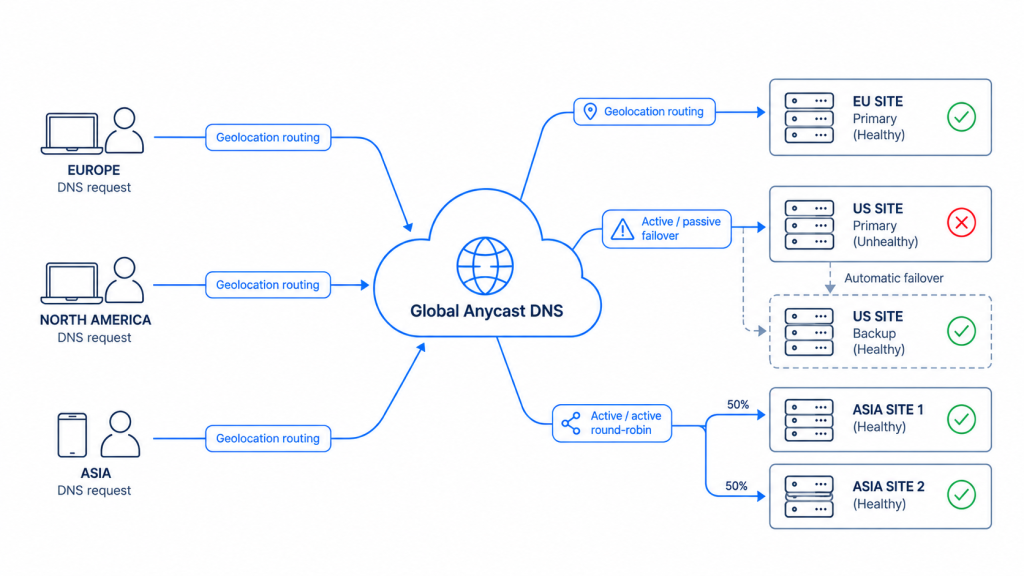
GSLB makes traffic-routing decisions across different locations, data centers, regions or clouds.
A resilient application can use both.
GSLB might first determine which location should serve a user. Once the traffic reaches that environment, a load balancer can distribute the request across the healthy application servers within it.
This is where load balancing starts to become part of a much broader application availability architecture.
Load balancing is part of application delivery
Years ago, it was common to think about load balancing primarily as a hardware appliance sitting in a data center.
That view is now too narrow.
Modern application delivery is concerned with the entire journey between a user and an application. It can include DNS, load balancing, Global Server Load Balancing, application delivery controllers, security, traffic management, health monitoring, connectivity and automated failover.
Load balancing remains an important part of that architecture, but it does not operate in isolation.
You can have highly redundant application servers and still experience an outage because DNS fails.
You can have excellent local load balancing but still lose availability because an entire cloud region becomes inaccessible.
You can have multiple data centers but no automated way to redirect users when one of them fails.
The objective is not simply to balance servers. It is to keep the application available throughout the delivery path.
Managed cloud or self-hosted load balancing?
There is also no longer a single way to deploy a load balancer.
Some organizations want to own and operate the application delivery infrastructure themselves. Others would rather consume it as a managed service. Many enterprises need a combination of both.
With managed cloud load balancing, the underlying load balancing platform is operated for you. This can be useful when you want resilient application traffic management without having to deploy and maintain the load balancer infrastructure yourself.
With a self-hosted load balancer or Application Delivery Controller, the technology runs inside infrastructure you control. That may be a data center, private cloud or public cloud environment and gives your team direct control over application delivery.
Total Uptime supports both approaches. Its managed Cloud Load Balancing service provides Layer 4 and Layer 7 traffic management, health monitoring, routing policies, persistence and automated failover, while edgeADC provides self-hosted application delivery with load balancing, health monitoring, SSL offload, acceleration, traffic management and high-availability capabilities.
For organizations that want broader managed application delivery capabilities rather than load balancing alone, ADC-as-a-Service extends the model further with application delivery, traffic management and health monitoring without requiring the customer to operate the underlying ADC platform.
The important question is not just where the traffic goes
Load balancing has come a long way from simply splitting traffic between two servers.
The principle is still easy to understand: do not make one resource responsible for everything. Distribute traffic across healthy infrastructure and have somewhere else to send users when something goes wrong.
But modern applications have made the surrounding question more important.
Can your application remain available when infrastructure changes, traffic increases or something fails?
Load balancing can play a major role in making that possible, but the strongest availability strategies look at the complete application delivery path, from DNS and connectivity through to traffic management, security, failover and the infrastructure running the application.
That is ultimately what modern application delivery is about: making sure users can reach the application they need, wherever that application happens to run.