DNS Failover Explained: From Health Checks to Hands-Free Automation
If your primary server, data center, or cloud region goes down at 3 a.m., how long does it take for traffic to move somewhere healthy, and who needs to be awake to make it happen?
For many teams, the answer still involves a pager, a VPN session, and someone manually editing DNS records. DNS failover is designed to remove that dependency on human intervention. Instead of waiting for someone to respond to an alert, it automatically detects the problem and directs traffic to healthy infrastructure, usually within a few minutes.
This guide explains what DNS failover is, how health checks drive the process, where TTL caching creates unavoidable limitations, how DNS failover differs from load balancing, and what you should look for when choosing a failover-capable DNS provider.
What is DNS failover?
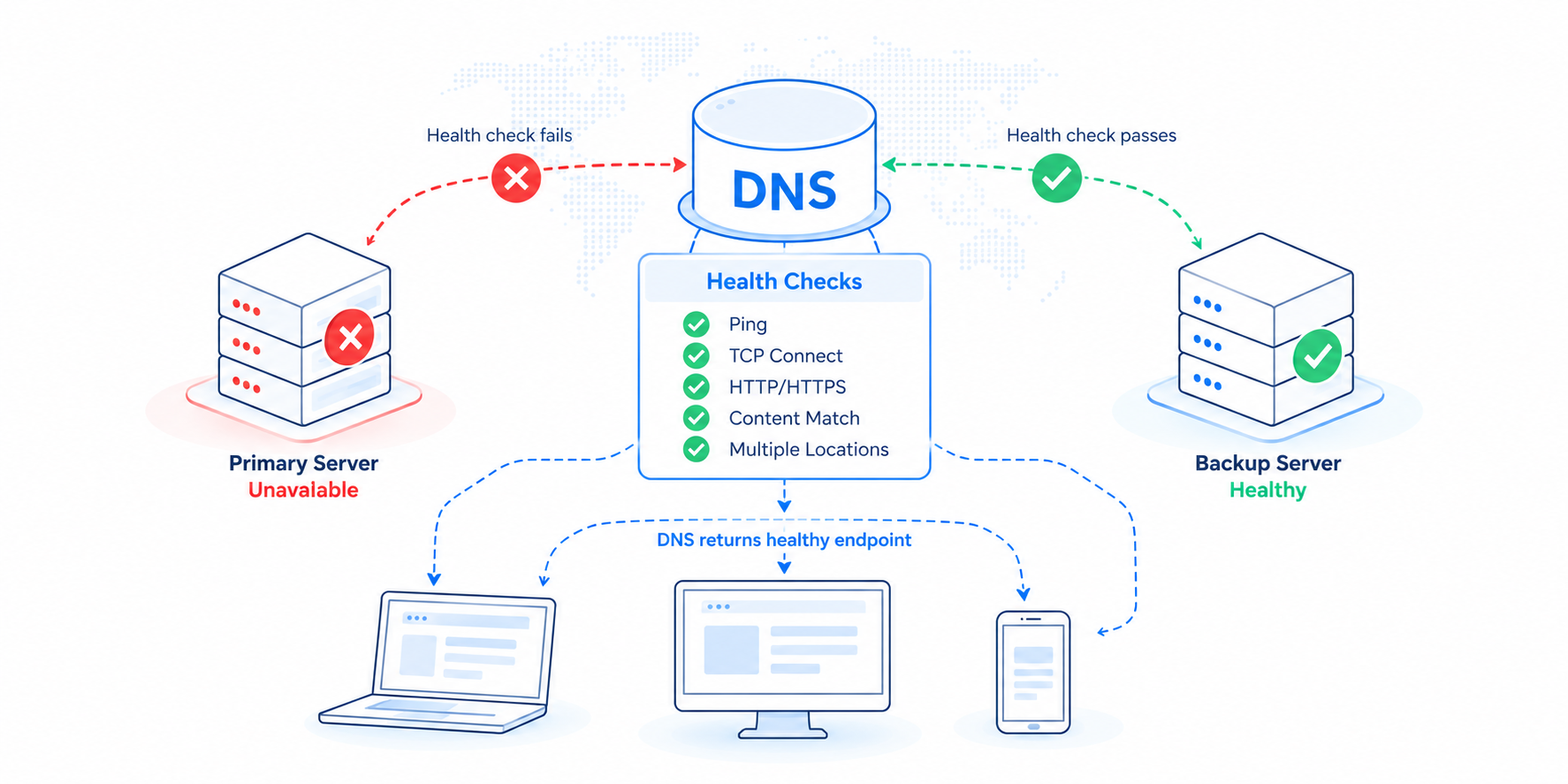
DNS failover automatically removes unhealthy endpoints from DNS responses so that users resolving your domain are directed only to infrastructure that is actually working.
The process combines three important elements:
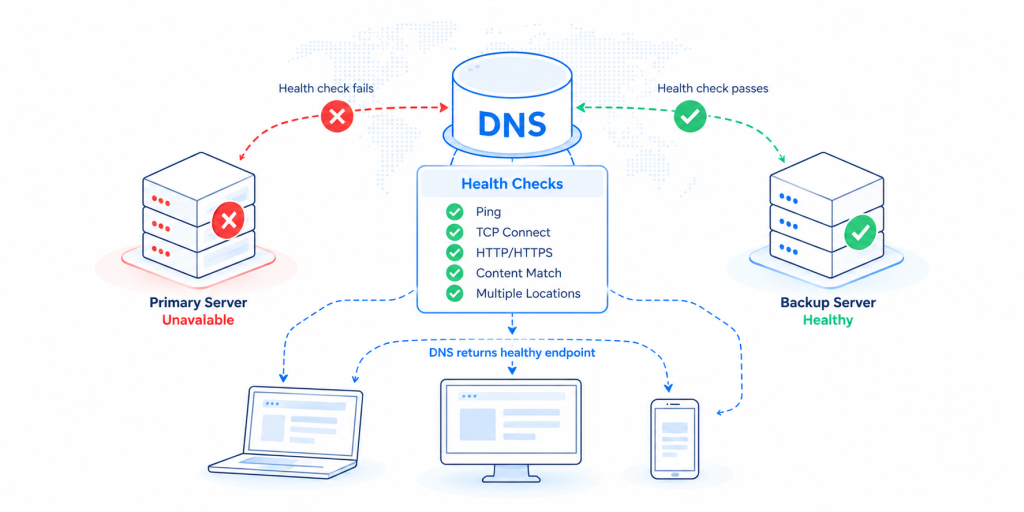
Monitoring (health checks). An external system continuously tests your endpoints, including web servers, APIs, mail servers, or entire regions, from multiple network locations.
Decision logic. When enough checks fail, the endpoint is declared unavailable according to rules you define.
Automatic DNS changes. The authoritative DNS provider stops returning the failed endpoint’s IP address and returns a healthy alternative instead.
The important part is that all of this happens automatically. As soon as a failure is detected and the configured threshold is reached, DNS responses change. There are no tickets to raise, no accounts to log into, and nobody needs to be making DNS changes at 3 a.m.
How health checks work
Health checks are effectively the sensory system behind DNS failover. If they are not configured correctly, everything that follows can be affected.
Monitoring targets
A good health check goes well beyond a simple ping. Typical check types include:
ICMP ping: Is the host reachable at all? This provides a useful baseline, but a server can respond to a ping even when the application running on it is unavailable.
TCP connect: Can a connection be opened on a specific port, such as 443, 25, or 3306? This confirms that the service is listening.
HTTP/HTTPS with content matching: Request a URL, verify the response code, and optionally look for a specific string in the response body. This helps catch the classic situation where the web server is technically online but the application itself is returning an error page.
Protocol-specific checks: DNS, SMTP, FTP, and other checks can be used for services that are not HTTP-based.
A good approach is to check a dedicated, lightweight health endpoint, such as /healthz, that tests the dependencies your application actually needs. This could include the database, cache, or upstream APIs.
Simply checking your homepage may not tell you very much. A homepage returning a 200 response from cache does not necessarily mean the underlying application is healthy.
Check frequency and location
Two variables have a major impact on how quickly and accurately a failure is detected.
Frequency. Typical probe intervals range from 30 seconds to five minutes. More frequent checks can identify failures sooner, but they also create additional load and increase the opportunity for false positives.
Distributed locations. Checks should originate from multiple geographic locations. If a single monitoring location loses connectivity to your endpoint because of a routing issue on the monitor’s side, you do not want that one failed check to trigger a failover.
Requiring two out of three, or three out of five, monitoring locations to agree before taking action helps distinguish a genuine outage from an isolated network problem.
TTL: the honest caveat
This is an important part of DNS failover that can sometimes get overlooked. DNS failover is not instantaneous because DNS responses are cached.
Every DNS record has a TTL, or time to live, which tells resolvers how long they are allowed to cache the response. When failover changes a DNS record, resolvers that already have the old answer cached may continue sending users to the failed endpoint until that cache entry expires. That could be a few seconds or the full duration of the TTL.
There are a few practical implications to consider:
Use low TTLs on failover-enabled records. A typical range is between 30 and 300 seconds. With a 300-second TTL, the worst-case failover time includes the failure detection period plus up to five minutes of stale cache.
Some resolvers ignore very low TTLs. A small number of ISPs enforce minimum cache times regardless of the TTL you publish. This means a percentage of users may experience a longer failover period than your TTL suggests.
Failover affects new DNS resolutions, not existing connections. Users who already have an established connection to the failed server are not automatically moved. Their client needs to perform another DNS resolution.
None of this makes DNS failover ineffective. It simply means DNS failover should be viewed as a recovery mechanism measured in minutes rather than milliseconds.
For most applications, having users automatically directed to healthy infrastructure within one to five minutes is a significant improvement over waiting for someone to receive an alert, log in, diagnose the problem, and manually edit DNS records.
Anatomy of a failover event
Here is what a properly configured DNS failover sequence might look like from beginning to end:
Steady state. Your
wwwrecord resolves to your primary server, IP A. Monitoring probes IP A every 30 seconds from four locations.Failure begins. The primary server stops responding because of a hardware fault, regional outage, or upstream provider failure.
Detection. Checks fail from three of the four monitoring locations across two consecutive intervals. After roughly 60 to 90 seconds, the configured failure threshold is reached.
Automatic update. The DNS provider marks IP A as unavailable and begins answering queries for
wwwwith the standby endpoint, IP B.Cache rollover. Over the next TTL window, perhaps 60 seconds, cached responses expire and resolvers around the world begin receiving IP B. Users are now directed to healthy infrastructure.
Alerting. Your team receives a notification about the failover, but the notification is informational. Nobody needs to respond before recovery can begin.
Failback. When IP A starts passing its health checks again for the required number of consecutive intervals, traffic can automatically return to it. Alternatively, you can require manual confirmation if you prefer controlled failback.
The total time from the initial failure to a full global traffic shift will typically be around two to six minutes, with much of that time determined by the detection interval and TTL.
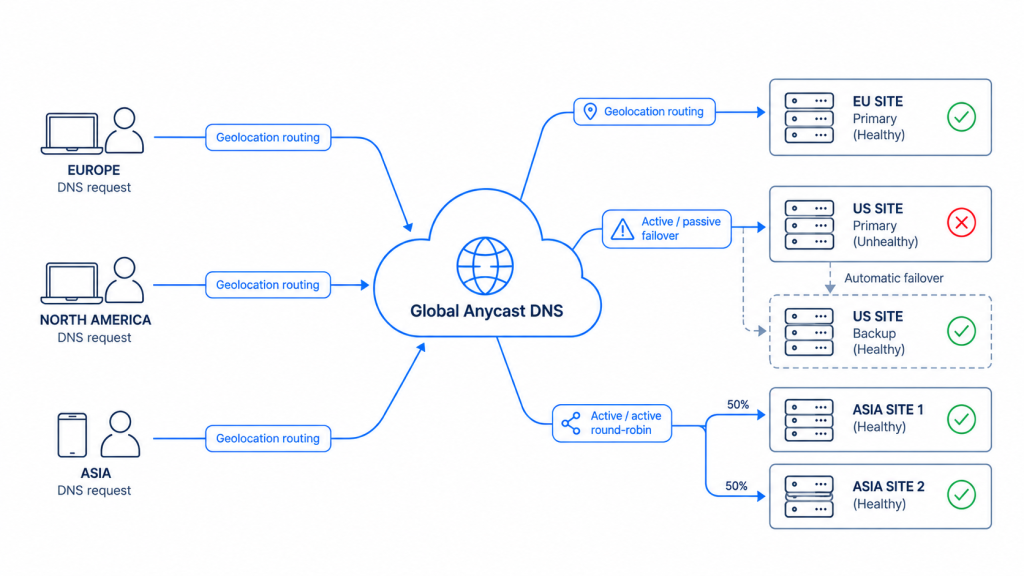
Active/passive vs. active/active
Two architectural approaches are commonly used when designing DNS failover.
Active/passive. One primary endpoint handles all traffic while one or more standby endpoints wait for a failure. This architecture is relatively straightforward, but there is an important consideration. The standby infrastructure is not regularly tested under real production load. A “cold” standby can sometimes reveal unexpected problems at exactly the wrong moment, which is why regular failover testing is essential.
Active/active. Two or more endpoints serve traffic simultaneously using load balancing or round-robin DNS. If one endpoint fails, it is simply removed from rotation. Because every endpoint is already serving production traffic, each one is continuously tested in a real environment. Failover can also be less disruptive because capacity is reduced rather than all traffic suddenly moving from one location to another.
The trade-off is that active/active environments need enough spare capacity to handle the loss of an endpoint, and managing session state can become more complex.
Neither model is inherently better. Active/passive can work well for smaller environments or applications with strict data consistency requirements. Active/active is often better suited to high-traffic applications designed to scale horizontally.
DNS failover vs. load balancing
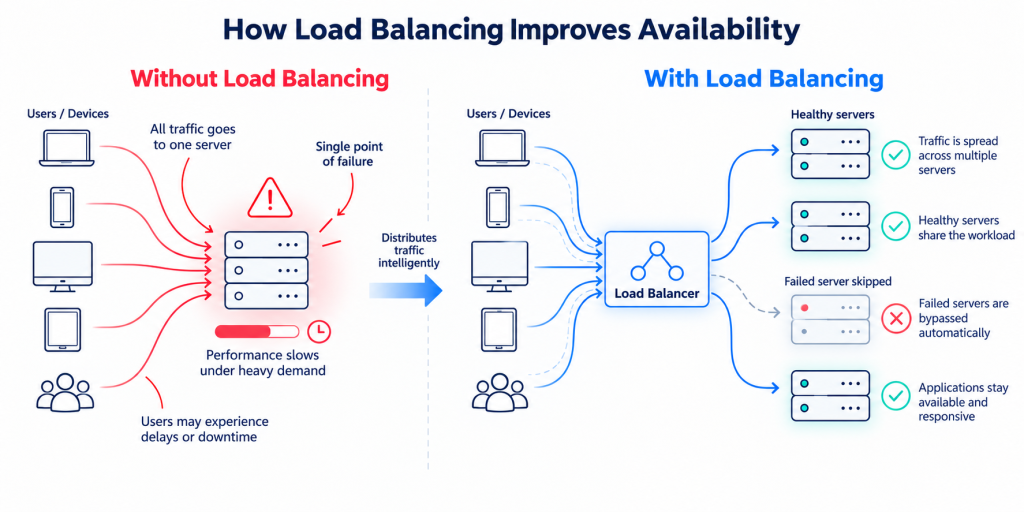
This is one of the most common areas of confusion. DNS failover and load balancing solve different problems, although mature environments often use both.
Load balancing distributes traffic across healthy endpoints to improve performance and manage capacity. When multiple systems are available, it determines how the workload should be shared.
Failover focuses on availability. It identifies when something has stopped working and removes that endpoint from the traffic path.
There is some overlap between the two. A DNS-based load balancing service with proper health checks effectively includes failover because an endpoint that fails its health checks can be removed from rotation or given zero weight.
For example, imagine weighted round-robin traffic distribution across three regions. If any region that fails its health checks is automatically excluded, the system is performing both load balancing and failover.
The more useful question, therefore, is not simply “Do I need load balancing or failover?” It is whether your provider’s load balancing includes genuine health checking or whether it is simply static round-robin DNS.
Static round-robin DNS can continue sending a portion of your users to a failed server because it has no way of knowing that the endpoint is unhealthy.
Combining failover with GEO routing
DNS failover and geographic routing work particularly well together.
Imagine that European users are normally directed to an endpoint in Frankfurt while North American users are directed to Virginia. Health checks monitor both locations independently.
If the Frankfurt endpoint fails, European users can automatically fail over to Virginia while North American traffic continues as normal.
This allows you to create regional failure domains instead of triggering a global failover every time one location has a problem.
When evaluating providers, look for the ability to apply health checks and failover logic at both the record and regional level rather than only globally.
Beyond disaster recovery: DNS as an automation layer
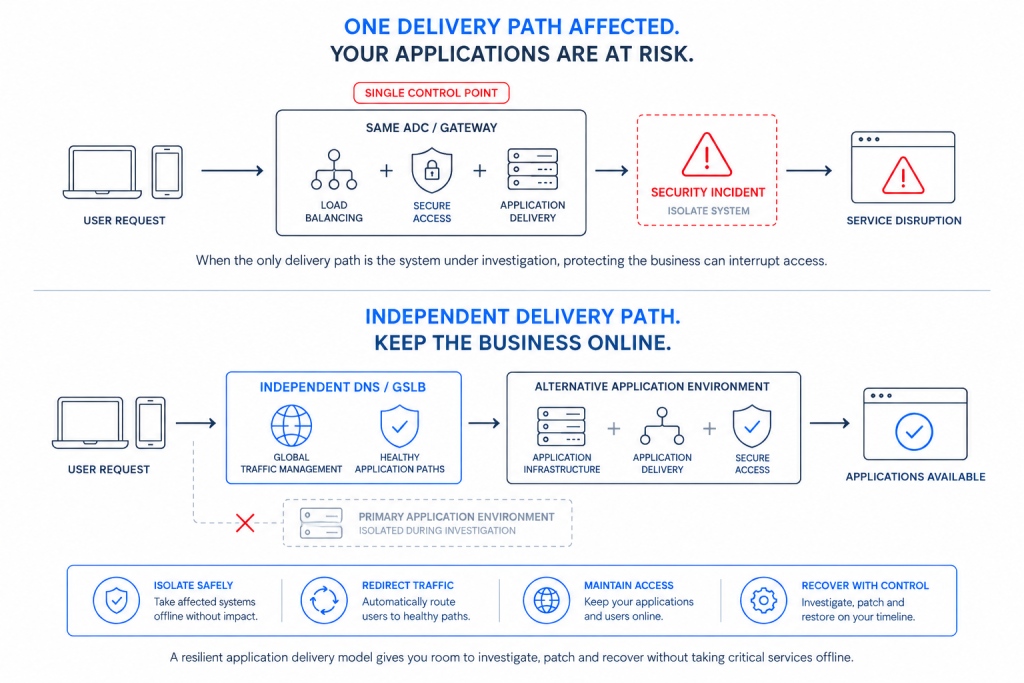
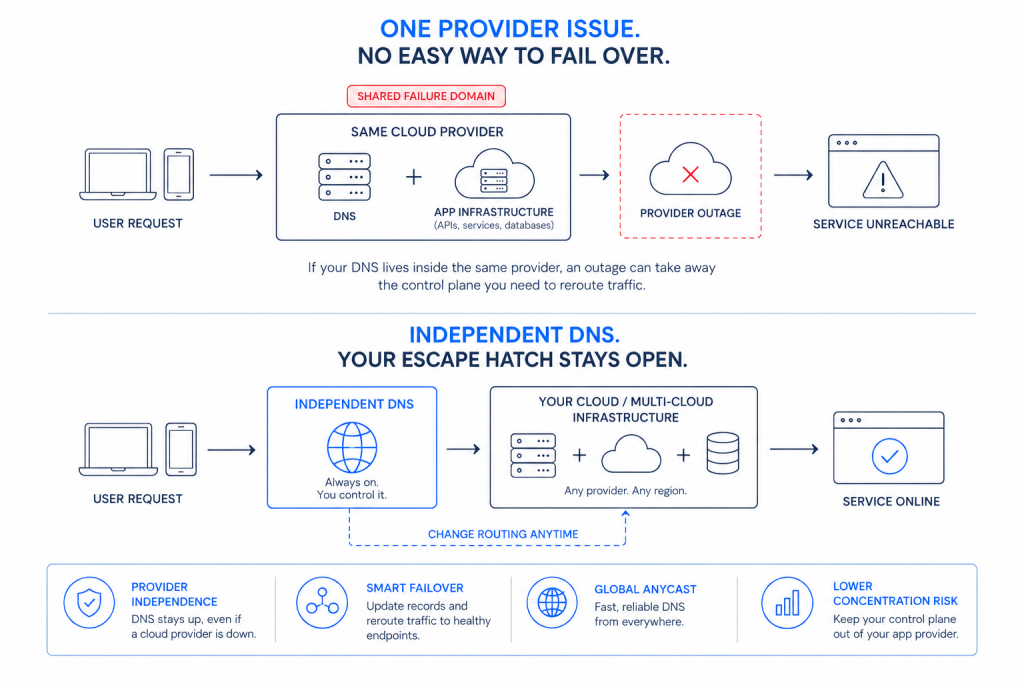
One of the more interesting developments in DNS failover is that it no longer needs to be treated purely as a disaster recovery tool.
Because health checks can monitor almost anything, not just your own servers, DNS can become part of a broader automation layer.
CDN bypass. Monitor the availability of your CDN for a particular hostname. If the CDN provider experiences an outage, traffic can automatically be directed to your origin or a secondary CDN until the primary provider recovers.
Cloud region arbitration. Health check multiple cloud regions and automatically shift traffic away from a degraded region when problems begin, potentially before the provider’s own status page has been updated.
Maintenance windows without downtime. Use an API to trigger or schedule DNS record changes so that deployments and migrations can route traffic away from systems undergoing maintenance.
Degraded-mode routing. Failover does not have to be triggered only when something is completely unavailable. If response times exceed a defined threshold, traffic could be shifted to a lighter version of the application or to another region.
The common thread is automation. An API-driven DNS provider with granular health checks allows operational decisions to be turned into policies that can be executed automatically, 24/7, without waiting for someone to intervene.
What to look for in a DNS failover provider
Not every DNS failover service offers the same capabilities. When comparing providers, there are several questions worth asking.
Check frequency and location diversity. How often are checks performed? How many locations are they run from? What confirmation logic is used before failover is triggered? Faster is not always better. An unstable system that repeatedly switches between endpoints can be worse than one that takes slightly longer to make a reliable decision.
Check types. Does the provider support HTTP content matching, TCP checks on arbitrary ports, and protocol-specific checks? A failover service based only on ping checks should raise questions.
TTL flexibility. Can you configure per-record TTLs as low as 30 to 60 seconds for failover-enabled records?
Failback control. Can you choose between automatic and manual failback? Does the system protect against flapping by requiring several consecutive successful checks before restoring traffic?
Included vs. add-on pricing. This is worth examining carefully because failover pricing models vary considerably. Some providers include only a small number of failover records in each plan and charge for additional records. Others meter health checks by endpoint or add surcharges for faster intervals. Some package failover as a separate load balancing add-on. A DNS service that initially looks inexpensive can become significantly more costly once failover, GEO routing, and health checks are added. Ask for the total cost of the configuration you actually need rather than relying on the entry-level price.
GEO routing integration. Can failover be configured independently by region, or does the provider support only global failover?
API and automation. Are all failover capabilities available through an API so that your monitoring systems, Terraform environment, or CI pipelines can integrate with them?
Alerting and audit trail. Does the platform provide notifications for failover and failback events, along with a searchable history showing what changed and why?
The bottom line
DNS failover cannot make recovery instantaneous. TTL caching and resolver behavior create practical limits, which means recovery is generally measured in minutes.
But there is a significant operational difference between traffic recovering automatically within two to six minutes at 3 a.m. and waiting 45 minutes for someone to notice an alert, log in, investigate the problem, and manually make changes.
For most teams, a strong DNS failover setup combines low-TTL records, distributed health checks with content matching, GEO-scoped failover where appropriate, and a DNS provider that treats failover as a core capability rather than an expensive add-on.
Failover without the add-on arithmetic. Total Uptime includes DNS failover, per-record GEO routing, and DNS load balancing in every plan, along with API access, fast health checks, and real human support.